SARAS (System for Assessment of License Fee Revenue and Spectrum Usage Charges) is an advanced, cloud-based application designed to simplify and enhance processes related to financial compliance under license agreements for stakeholders in the telecommunications sector. It acts as a single window for Paperless payment of License Fee(LF), Spectrum Usage Charges(SUC), Spectrum Auction Payments, CAF Penalty, EMR Testing Fee, EMR Penalty, LD and Other Penalties. It also enables paperless submission of Statements of Revenue and LF and Annual Financial Statements for License Fee. It also facilitates online Deduction submission and its Verification, Online issuance of notices LF, SUC and other dues(CAF Penalty, EMR Testing Fee, EMR Penalty, LD and Other Penalties). It is fully integrated with Bharatkosh Portal for facilitating seamless payment experience.
Launched on January 15, 2021, SARAS provides facility for online payment of following category of DOT Receipts:
a. License Fee(LF)
b. Spectrum Usage Charges(SUC)
c. Spectrum Auction Payments
d. CAF Penalty
e. EMR Testing Fee and EMR Penalty
f. LD and Other Penalties.
Out of above, License Fee and Spectrum Usage Charges are payable on Quarterly basis. Apart from said payments, SARAS provides facility for online paperless submission of Statement of Revenue and License Fee on Quarterly basis (Unaudited) and Audited Statement of Revenue and License Fee along with Annual Financial Statement and Audited Reconciliation Statement after end of the financial year.
Licensees have access to the online Deduction submission and its Verification along with online assessment of License Fee (LF) and Spectrum Usage Charges (SUC) and their appeal process. Licensee can also access the notices for other dues e.g. CAF Penalty, EMR Testing Fee, EMR Penalty, LD and Other Penalties and make payments.
Key Benefits for Licensees:
- Paperless Transactions: Enjoy the convenience of making online payments for LF, SUC, Spectrum Auction payments, CAF/EMR penalties, testing fees, and other penalties.
- Digital Compliance: Benefit from fully digital and paperless submission of quarterly Statements of Revenue and License Fee, as well as annual audited documents and financial statements.
- Streamlined Deduction Verification: Submit deduction verification online with ease.
- Accessible Notices and Assessments: Access online assessments and demand notices for LF, SUC, and other dues, ensuring timely compliance.
- Effective Grievance Management: Lodge and resolve grievances online for a hassle-free experience
The SARAS portal can be accessed by
- Telecom Licensees after obtaining license/authorization from Department of Telecommunications
- Concerned users from the Department of Telecommunications
Statement of Revenue and License Fee (Unaudited) on Quarterly Basis as per license agreement
Audited Statement of Revenue and License Fee at the end of Financial Year
Annual Financial Statements
Audited Reconciliation Statement
Documents for Verification of deductions
1
Receipt of License/Authorization by SARAS from SARAL SANCHAR including Bank Guarantee information
After signing of License Agreement, SARAS obtains the license/Authorization detail digitally from SARAL SANCHAR along with Bank Guarantee information.
2
Creation of Admin User ID in SARAS
License information is made available by CGCA office to the concerned Controller of communication Accounts (CCA) office in the Portal, where licensee has its registered office. The said CCA office creates the Admin User ID
3
First login by Admin user
The Admin User has to login to SARAS and reset the password.
4
Creation of Maker and checker users by licensee
Admin user is required to create maker and checker for each license/authorization.
5
Login by maker/checker
Maker/checker users can login and reset the password and then carry out their assigned tasks. The user manuals can be access in their login for any assistance.
6
Submission of Quarterly documents and payments
License Maker and checker can submit the documents to be submitted on quarterly basis through SARAS and make payments after 2-level process.
7
Submission of Annual documents and payments
License Admin can submit the documents to be submitted on Annual basis- Annual Financial Statement and Audited Reconciliation Statement- through SARAS.
8
Payment against notices and demands
License Maker and checker can make payments after 2-level process in response to notice issued for LF, SUC and other dues
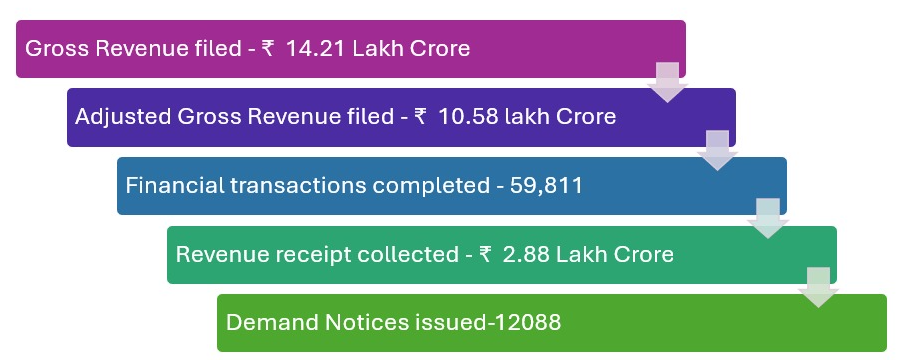
Key Milestones of SARAS Since Inception- (As on Nov 2024)

 Beta
Beta What’s New ?

Details of Service
Launched on January 15, 2021, SARAS provides facility for online payment of following category of DOT Receipts:
a. License Fee(LF)
b. Spectrum Usage Charges(SUC)
c. Spectrum Auction Payments
d. CAF Penalty
e. EMR Testing Fee and EMR Penalty
f. LD and Other Penalties.
Out of above, License Fee and Spectrum Usage Charges are payable on Quarterly basis. Apart from said payments, SARAS provides facility for online paperless submission of Statement of Revenue and License Fee on Quarterly basis (Unaudited) and Audited Statement of Revenue and License Fee along with Annual Financial Statement and Audited Reconciliation Statement after end of the financial year.
Licensees have access to the online Deduction submission and its Verification along with online assessment of License Fee (LF) and Spectrum Usage Charges (SUC) and their appeal process. Licensee can also access the notices for other dues e.g. CAF Penalty, EMR Testing Fee, EMR Penalty, LD and Other Penalties and make payments.
Key Benefits for Licensees:
Who Can Apply
The SARAS portal can be accessed by
Documents Required
Fees and Charges
Application Process
Statistics
Key Milestones of SARAS Since Inception- (As on Nov 2024)
Policy / Circular / Presentation
Helpdesk Support:
SARAS Helpline No. 011-23372044
SARAS E-Mail Helpline - Support.saras-dot@gov.in
This helpdesk is operational during working hours on working days.
------------------------------------------------------------------------
For specific matter pertaining to SARAS portal, kindly reach back to our dedicated SARAS helpdesk-
Dedicated help desk for all licensees
Validity
Frequently Asked Questions